Amber M100 Specs, Features, and Value: Is it worth the price tag?
The Amber M100 is a compact 4x6 photo printer marketed toward enthusiasts who want lab-quality prints on demand without visiting a photo lab. Using dye-sublimation printing and an integrated lamination process, the M100 aims to deliver durable, glossy photos with accurate colors and a finish that resists water, scratches, and fading. This article examines the Amber M100’s specifications and real-world performance, compares it to alternative options, outlines the pros and cons, and offers a practical buying guide so potential buyers can decide whether it justifies its cost.
Introduction: what the Amber M100 is and who it’s for
The Amber M100 is built for users who prioritize print quality, photo longevity, and convenience. It sits between small instant mobile printers that produce wallet-sized photos and larger home photo labs. Typical buyers include hobbyist photographers, parents who want physical prints of family moments, and small-event hosts who need on-site printing for guests. The M100’s feature set—4x6 prints, dye-sublimation chemistry, mobile app control, and simple media handling—targets people who want near-professional prints without dealing with lab turnaround times.
Key specifications and features
- Print technology: Dye-sublimation (thermal transfer) with a built-in lamination step for protective coating.
- Print size: 4 x 6 inches (standard photographic size).
- Resolution: 300 x 300 dpi (printer rendering optimized for photographic output).
- Print speed: Approximately one minute per 4x6 print under typical conditions.
- Durability: Prints are laminated during production to resist water, fading, and scratches.
- Connectivity: Wi‑Fi hotspot mode (Wi‑Fi Direct) to connect mobile devices and computers; supports multiple devices simultaneously.
- Paper capacity: Top-loading tray holds a modest stack of sheets (commonly around 20 sheets depending on the bundle).
- Consumables: Combined dye ribbon/cartridge and dedicated 4x6 photo paper; cartridge swaps are designed to be simple.
- Power: Mains-powered with compact footprint; some market variants or accessory kits may offer battery options, but standard units are plug-in devices.
- Mobile app: Companion app available for iOS and Android to crop, adjust, and compose prints (including templates for multi-photo layouts, ID or passport formats).
Detailed product review and analysis
Print quality and color fidelity
The Amber M100’s dye-sublimation process produces smooth tonal gradations and continuous-tone photos that are noticeably different from inkjet prints. The addition of a laminated protective layer means the surface is glossy and resistant to smudging immediately after printing—useful for handing prints to guests or storing them in albums right away. Colors generally appear vivid, and skin tones look natural in most lighting conditions. As with any printer, results depend on source image quality and how the mobile app handles color management; users should expect minor shifts between screen preview and final print, especially for highly saturated blues and cyans.
Speed and throughput
At roughly one minute per 4x6 photo, the M100 is not instantaneous like ZINK-based pocket printers, but it balances quality and speed for small batches. For home use—printing family photos, travel shots, or craft projects—the speed is convenient. At events with many guests, throughput becomes a practical consideration: printing dozens of photos in succession will take significant time and will require monitoring consumables and paper replenishment.
Ease of use and setup
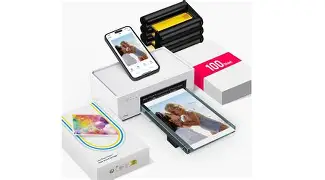
Setup is straightforward: unbox, load a paper stack, insert a ribbon/cartridge, and connect devices via the printer’s Wi‑Fi hotspot. The mobile app guides cropping and layout, and cartridge swaps are simple. The M100’s physical controls are minimal by design, putting most interaction in the mobile app—ideal for users who prefer smartphone-first workflows. For photographers who want direct USB tethering or advanced color profiles, the M100 provides simpler, consumer-facing options rather than professional color-management features.
Durability and handling of prints
Printed photos come with a laminated finish that enhances longevity. This is a meaningful advantage for users who plan to store prints in photo albums, hand them out at events, or keep them in wallets and scrapbooks where handling is frequent. The lamination also adds a protective barrier against moisture and fingerprints, which many buyers appreciate compared with unlaminated inkjet photos.
Mobile app, features, and editing
The companion app provides common tools—crop, rotate, templates, and simple color adjustments—so users can prepare a print without desktop software. Templates for ID photos and multi-photo layouts are practical for small projects. Advanced users may find the editing capabilities basic, but the app is sufficient for most everyday printing tasks. The convenience of printing directly from a phone outweighs the limited editing for most consumer use cases.
Looking for the best Electronics deals on Amazon?
See Deals →Consumables and running costs
The M100 uses combined dye/ribbon cartridges and branded 4x6 paper. Consumers should factor ongoing consumable costs into the purchase decision: dye-sublimation media tends to be more expensive per print than generic inkjet paper, though the added durability and quality are often cited as trade-offs buyers accept. Cost-conscious users should calculate estimated per-print cost based on cartridge yield and paper pack sizes for a realistic long-term view.
Real-world use cases
- Family albums and keepsakes: Parents who want physical copies of milestones and vacations will appreciate the 4x6 format for album-ready photos.
- Parties and small events: Hosts can print small batches of guest photos on site, offering tangible memories—useful at weddings, birthdays, or reunions where an instant memento is valued.
- Photographer proofing: Photographers can use the M100 for quick client proofs during shoots where 4x6 contact prints are sufficient.
- Scrapbooking and crafts: The M100’s print size and laminated finish make the output ideal for craft projects that require resilient photos.
- ID and visa photos: Built-in templates in the app allow users to format images to common document sizes, though professional ID standards should be verified for official uses.
Pros & Cons
Pros
- Produces durable, laminated 4x6 prints suitable for albums and handling.
- Excellent color reproduction and smooth tonal gradations compared to dye-based inkjets.
- Mobile-first workflow with Wi‑Fi Direct connectivity for quick smartphone printing.
- Straightforward consumable swaps and low maintenance.
- Compact footprint that fits on desktops without a large setup.
Cons
- Per-print consumable cost is higher than cheap inkjet or ZINK pocket printers.
- Not the fastest option for high-volume event printing—~1 minute per print limits throughput.
- Limited advanced color management for professional studio workflows.
- Standard units are mains-powered; portability depends on optional accessories or battery variants.
- Mobile app editing tools are basic compared with desktop image editors.
Comparison table: Amber M100 vs. common alternatives
| Feature | Amber M100 | Canon Selphy CP Series (e.g., CP1300) | Fujifilm Instax Share / Instax Mini Printers |
|---|---|---|---|
| Print technology | Dye-sublimation with lamination | Dye-sublimation (Canon Selphy) | ZINK or Instax instant film (chemical instant) |
| Standard print size | 4 x 6 inches | 4 x 6 inches (postcard/standard) | Instax Mini: ~2.4 x 1.8 inches (smaller) |
| Typical print quality | High, laminated, photo-grade | High, photo-grade | Good for instant novelty; lower resolution than 4x6 dye-sublimation |
| Durability | Water/scratch-resistant (laminated) | Reasonably durable (some lamination/overlay) | Less robust; susceptible to bending and moisture |
| Connectivity | Wi‑Fi Direct / mobile app | Wi‑Fi / USB / SD options | Bluetooth / mobile app (phone-first) |
| Best for | Album-ready 4x6 prints, small events | Home photo printing with flexible inputs | Instant social prints and pocket-size mementos |
Buying guide: what to consider before purchase
1. Print size and intended use
Decide whether 4x6 prints match your needs. For traditional photo albums and framed snapshots, 4x6 is ideal. If the goal is to hand out small keepsakes or stickers, smaller Instax or ZINK printers might be more appropriate.
2. Print quality versus running cost
Dye-sublimation printers like the Amber M100 offer superior photographic quality and durability but cost more per print than inkjet or ZINK alternatives. Evaluate how many prints will be produced monthly and calculate a projected consumable budget.
3. Portability and power
If printing on location (events, travel), check whether a battery pack or portable variant is available. The standard M100 is primarily mains-powered, so consider power access at intended venues.
4. Connectivity and workflow
Confirm that the printer’s connection options fit the workflow: Wi‑Fi Direct is handy for phones and tablets but may not integrate with some network printers used in offices. For tethered workflows, verify USB compatibility with preferred devices.
5. App features and editing
Review the companion app’s editing and layout tools to ensure they meet expectations. Many casual users find phone-side editing adequate, but photographers who do color-critical work may prefer a printer that supports ICC profiles and desktop drivers.
6. Consumables availability and warranty
Check the availability of branded paper and cartridges in local or online markets. Long-term availability affects total cost and convenience. Also confirm warranty terms and service options in the buyer’s country or region.
Find top-rated Electronics products at great prices.
Shop Amazon →7. Event throughput needs
For event hosts, throughput matters more than single-print quality. If dozens or hundreds of prints are expected over an event, either plan for multiple printers, staggered drop-off printing, or a dedicated lab service to handle volume.
Price-to-value considerations
When assessing whether the Amber M100 is worth its price, potential buyers should weigh three primary factors: print quality, convenience, and running costs. For those who value archival-quality 4x6 prints with an immediate laminated finish—such as parents preserving memories, scrapbookers, and photographers providing quick proofs—the M100’s benefits are tangible. Conversely, casual users who want low-cost novelty prints or pocket-sized mementos may find cheaper alternatives better suited to their budget.
Another element is longevity: laminated dye-sublimation prints reduce concerns about fading or water damage, which can make the higher initial cost more justifiable for prints intended to be kept long-term.
Practical tips for getting the best results
- Use high-resolution source images and correct exposure before printing; the printer reproduces detail but will also reveal sharpening and compression artifacts.
- Preview and crop in the companion app to avoid unintended borders or cutoffs—4x6 framing differs from many phone aspect ratios.
- Keep spare paper and ribbon cartridges on hand for events or batch projects to avoid interruptions.
- Store paper and cartridges in a dry, cool place to prevent print defects and ensure consistent output.
- Test color profiles with sample prints if exact color matching is critical; make small adjustments in the app rather than expecting perfect screen-to-print matching.
Conclusion
The Amber M100 is a compelling option for buyers who want a balance of print quality, convenience, and durability in a compact package. Its dye-sublimation printing with lamination produces album-ready 4x6 photographs that stand up to handling and display, which is a real advantage over many instant pocket printers. The trade-offs are higher per-print consumable costs and modest throughput—factors that matter most for heavy users and event professionals.
For parents, hobbyist photographers, and hosts of small gatherings who value tangible, long-lasting photos without the delay of lab processing, the Amber M100 offers clear benefits. Those primarily seeking the cheapest possible prints, the smallest pocketsized mementos, or extremely fast high-volume output should compare alternatives that better match those priorities. Ultimately, the M100’s worth depends on how much value a buyer places on print longevity, finish quality, and the convenience of producing true 4x6 photographic prints at home or on location.