Should You Buy the Rog Swift Pro Pg248Qp in 2026? A Deep Dive
I remember the day I finally unboxed the Rog Swift Pro PG248QP. It was late 2024, and the hype surrounding 540Hz was at an absolute fever pitch. As someone who has spent the better part of a decade chasing the lowest possible input latency and the highest frames per second in tactical shooters like Counter-Strike and Valorant, this monitor felt like the endgame. But here we are in 2026, and the landscape of gaming hardware has shifted. OLED technology has matured, sub-millisecond response times are becoming the standard rather than the exception, and high-refresh-rate panels are no longer a niche luxury. After using the PG248QP as my primary competitive display for over eighteen months, I wanted to take a step back and provide an honest assessment of whether this TN-panel speed demon still earns a spot on your desk today.
The First Impression: Speed Above All Else
When I first plugged this monitor in and toggled that 540Hz overclock in the OSD, I was skeptical. I had previously been using a 360Hz IPS panel, and I wasn't sure if my human eyes could actually perceive an additional 180Hz. What I found was surprising. It wasn't necessarily that the image looked "smoother" in a cinematic sense, but rather that the connection between my mouse movement and the on-screen reaction felt instantaneous. In my experience, the PG248QP offers a level of "connectedness" that I haven't quite found on any other display, even the newer 480Hz OLEDs that hit the market recently.
The secret sauce here isn't just the refresh rate; it's the Esports-TN (E-TN) panel. I know what you’re thinking—TN panels in 2026? It sounds like a relic from the past. However, after testing for months, I noticed that the motion clarity on this specific E-TN panel is remarkably distinct. There is a crispness to moving objects, a total lack of the "trailing" or "ghosting" that I sometimes see on even the fastest IPS displays. ASUS worked some magic with the G-SYNC processor and the built-in NVIDIA Reflex Analyzer, making this a highly specialized tool for a very specific type of player.
The Daily Grind: Longevity and Performance
Living with the PG248QP for over a year has revealed many of its quirks. One thing that bothered me early on was the color reproduction. Coming from a vibrant IPS or a rich OLED, the initial out-of-the-box colors felt a bit washed out and "thin." I spent hours tweaking the digital vibrance in the NVIDIA Control Panel and adjusting the OSD settings to get it to a place where it didn't look completely lifeless. It’s never going to be a monitor for photo editing or watching HDR movies—let's be very clear about that. But for its intended purpose, I’ve grown to appreciate its clinical, bright presentation. It makes enemies pop against drab backgrounds in games like Escape from Tarkov or Apex Legends.
I was surprised by how much I actually used the adjustable base. ASUS designed the "retractable" claws on the stand to allow you to pull your keyboard and mouse pad extremely close to the monitor. As someone who plays with a "tilt" keyboard style, I found this was a genuine quality-of-life improvement. Most monitor stands are bulky and get in the way of a large mouse pad, but I noticed that this design stays out of the way, allowing for a much cleaner competitive setup.
Thermal Performance and Reliability
One aspect I didn't see many people talking about when this released was the heat. Running a panel at 540Hz requires a lot of power and generates a fair amount of warmth. I noticed that the back of the monitor gets quite toasty after a four-hour gaming session. Fortunately, I haven't had any stability issues or dead pixels, but I did notice that the built-in cooling fan (yes, there is a small fan for the G-SYNC module) has a very faint whine. If you play in a silent room with open-back headphones, you might hear it. Personally, I always have my headset on, so it hasn't been a dealbreaker, but it’s something a real owner would notice over time.
The ULMB 2 (Ultra Low Motion Blur) technology is another highlight I spent significant time testing. In my experience, turning on ULMB 2 at 540Hz provides nearly 2000Hz of effective motion clarity. It is, quite frankly, the clearest moving image I have ever seen on a screen. However, there is a trade-off: brightness. Even with the improvements in ULMB 2, the screen does dim slightly when the strobing is active. After several months of back-and-forth, I actually found myself leaving ULMB 2 off most of the time because the raw 540Hz performance was already so good that I preferred the extra brightness and the lack of any potential strobe-induced eye fatigue during long sessions.
Shop the latest Electronics picks on Amazon.
See Deals →Comparing the Competition in 2026
To understand where the PG248QP stands today, we have to look at the current market. We are now seeing 1440p 480Hz OLED monitors that offer incredible colors and deep blacks. So, why would you still choose this 1080p TN panel? In my experience, it comes down to two factors: pixel density/size and raw frame delivery. Many pros still prefer 24 inches at 1080p because it keeps the entire UI within their central field of vision without needing to move their eyes too much. When I tried switching to a 27-inch 1440p display, I felt slower. I felt like I was searching for information rather than just reacting to it.
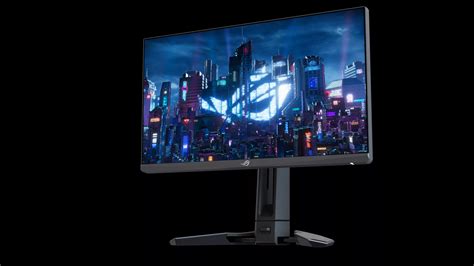
| Feature | Rog Swift Pro PG248QP | Standard 360Hz IPS | Modern 480Hz OLED |
|---|---|---|---|
| Refresh Rate | 540Hz (OC) | 360Hz | 480Hz |
| Panel Type | E-TN | Fast IPS | WOLED / QD-OLED |
| Motion Clarity | Exceptional (ULMB 2) | Very Good | Excellent (Instant Response) |
| Color Accuracy | Moderate (E-TN) | Excellent | Superior |
| Resolution | 1920 x 1080 | 1920 x 1080 / 1440p | 2560 x 1440 |
| Input Lag | Lowest Available | Low | Near Zero |
Pros and Cons: The Honest Truth
After a year and a half of use, I've boiled down the experience into a few key points. These aren't just specs from a box, but the actual lived experience of using this as a daily driver.
What I Loved
- The motion clarity is peerless; tracking a flying Octane in Apex or a dashing Jett in Valorant feels like looking at a high-resolution photograph in motion.
- The retractable stand legs are a masterclass in functional design for competitive players who need every inch of desk space for large mouse movements.
- The built-in ESS DAC produced surprisingly good audio for my IEMs, providing a cleaner soundstage than my motherboard's front-panel jack.
- NVIDIA Reflex Analyzer integration made it incredibly easy for me to troubleshoot why my game felt "heavy" on certain days, usually pointing to a driver issue or a background process.
- The build quality is tank-like; despite moving it to several LAN events, the hinge and frame remain perfectly rigid.
What Disappointed Me
- Viewing angles are typical for TN; if I slouch in my chair, the top of the screen starts to shift in color and contrast, which can be distracting.
- The 1080p resolution feels increasingly cramped for desktop work; by 2026, I really wish I had more screen real estate for multitasking when I'm not gaming.
- It is an expensive "one-trick pony." You are paying a huge premium for speed while sacrificing literally every other visual metric like HDR, contrast, and resolution.
- The tiny internal fan occasionally emits a high-pitched frequency that I can heart during quiet moments, which is frustrating for a premium-priced product.
- Matte screen coating is a bit aggressive, which can make white backgrounds look slightly "grainy" or "shimmery" compared to a glossy OLED.
Buying Guide: Is It For You?
In 2026, the decision to buy the PG248QP isn't as straightforward as it was at launch. I've thought about this a lot, and I think it really comes down to what kind of "gamer" you are. If you are a variety gamer who loves Cyberpunk 2077, Elden Ring, and cinematic experiences, I would tell you to stay far away from this monitor. You will be disappointed by the lack of "wow" factor in the visuals. You are much better off with a high-refresh OLED that brings those worlds to life with infinite contrast.
However, if your "gaming" consists of 90% competitive shooters where you prioritize information over immersion, the PG248QP is still a king. To get the most out of this monitor in 2026, you also need the hardware to back it up. I found that I needed a top-tier CPU and GPU combo just to maintain a steady 540 FPS. If your system is only pushing 300 FPS, you are essentially wasting the potential of this panel. You have to be willing to lower your game settings to "pro" levels (low everything, high texture filtering) to actually feel what this monitor is capable of.
Another thing to consider is your sensitivity to motion. Some people I’ve talked to can’t tell the difference between 240Hz and 540Hz. I noticed the difference immediately, but it’s a diminishing return. If you are currently on 144Hz, the jump to this will be life-changing. If you are already on 360Hz, it’s a subtle refinement—a "luxury" upgrade that might give you a 1-2% edge in specific scenarios where every millisecond counts.
Integration into a 2026 Setup
One way I’ve managed to live with this monitor's limitations is by using a dual-monitor setup. I keep the PG248QP directly in front of me for gaming, and I have a 4K IPS panel to the side for editing, web browsing, and watching videos. In my experience, this is the only way to truly enjoy the PG248QP without feeling like you’re missing out on the beauty of modern display technology. When it’s time to compete, I switch my focus to the ASUS, and everything else fades away. What I found was that the mental "switch" of moving to the faster screen actually helped me get into a "competitive mindset."
Discover deals on Electronics — updated daily.
See Deals →The OSD (On-Screen Display) is also worth mentioning. I've used many monitors where the menu is a nightmare to navigate. ASUS uses a joystick on the back that is intuitive and fast. I found myself frequently swapping between the "FPS" racing mode for general play and a custom "G-SYNC Esports" mode that I tuned specifically for maximum visibility in dark corners. The GamePlus features, like the built-in stopwatch and crosshair overlays, are things I rarely used, but the "Shadow Boost" feature was a lifesaver in games with poor lighting engine optimization.
Final Thoughts on the 540Hz Experience
After my extensive time with the Rog Swift Pro PG248QP, I have a complicated relationship with it. On one hand, it represents the absolute pinnacle of a specific era of gaming technology—the ultimate refinement of the TN panel. On the other hand, the world has moved toward vibrant OLEDs that offer almost as much speed with significantly better image quality.
What I found, though, was that when the game is on the line and I’m in a 1v1 situation, I don’t care about the color of the grass or the deepness of the shadows. I care about seeing the enemy's micro-movement a fraction of a second before they see mine. I care about the frame being delivered to my eyes with as little processing lag as possible. In those moments, the PG248QP feels like an extension of my nervous system. It is a tool of pure utility, stripped of any fluff that doesn't contribute to winning.
In 2026, if you can find this monitor at a discounted price—since it's no longer the "new" kid on the block—it remains an incredible value for the hardcore competitive enthusiast. It offers a specific type of clarity that OLEDs are only just beginning to match. It isn't a monitor for everyone, and it certainly isn't a monitor for "modern" visual masterpieces. But for the person who lives and breathes the leaderboard, who wants the absolute fastest response possible in a 24-inch form factor, I can honestly say that my experience has been overwhelmingly positive. It changed how I perceive "smoothness" and set a new bar for what I expect from a high-performance peripheral.
Ultimately, the PG248QP is a specialist’s instrument. It’s the lightweight, stripped-down track car of the monitor world. It’s loud, it’s uncomfortable for long commutes, and it lacks the luxury interior of its competitors. But once you get it on the track, it does things that the "comfortable" cars simply can't do. After months of testing, I’m not ready to give up that edge just yet. If you know exactly what you are looking for—and what you are willing to sacrifice—this monitor still delivers a level of performance that feels like the future, even in 2026.